
scripting/echo-chamber
- Category
-
scripting - Author
-
n nalo_
The file we are given is a .pcap file. This kind of file is some networking capture. The go to tools to read it is Wireshark.
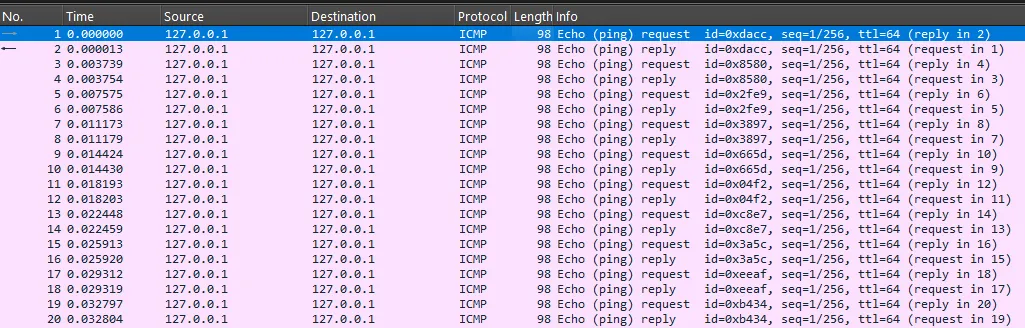
Opening it, we can see that it is exclusively composed of ICMP Echo (ping) requests and replies:
The challenge being categorized as scripting, we surely have to write some code to extract some value. To achieve this, we will use the pyshark module, that gives some API to tshark, the CLI version of WireShark.
Method 1: Extract flag from data
Using Wireshark, I saw that each ICMP request had some bunch data repeated 24 times each time.
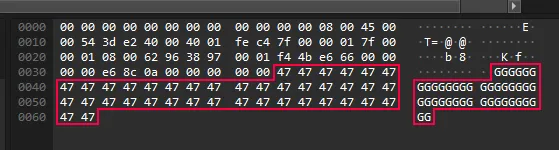
I wrote a script that read each event of this capture, keep only ICMP (there’s only ICMP) and only the requests (not the replies). For each, I gather its data, and save it only if it’s ASCII.
I search for the flag on the output, and bingo!
import pyshark
cap = pyshark.FileCapture("echo_chamber.pcap")
out = ""for packet in cap: if "ICMP" in packet: icmp_layer = packet.icmp # ICMP Layer if hasattr(icmp_layer, "type") and icmp_layer.type == "0": continue # Skip ICMP Echo Reply ('0') (data is same as Echo Request ('8'))
if hasattr(icmp_layer, "data"): try: data = bytes.fromhex(icmp_layer.data[:2]).decode("utf-8") out += data except UnicodeDecodeError: pass # skip non-ascii (and non-printable) characters
print(out[out.find("flag{") :][:38]) # find the flag in the outputMethod 2: Build back the transfered image
But I saw that the ouput data has the famous PNG indicator at the very beginning, has if it was a picture.
To confirm that, I took all the data (including non-ascii), output it in a file opened as raw binary. After the execution, the file was a working PNG-file showing the flag as well!
import pyshark
cap = pyshark.FileCapture("echo_chamber.pcap")
with open("echo_chamber.png", "wb") as f: for packet in cap: if "ICMP" in packet: icmp_layer = packet.icmp # ICMP Layer if hasattr(icmp_layer, "type") and icmp_layer.type == "0": continue # Skip ICMP Echo Reply ('0') (data is same as Echo Request ('8'))
if hasattr(icmp_layer, "data"): data = bytes.fromhex(icmp_layer.data[:2]) f.write(data)