misc/i-cant-ssh
- Category
-
misc - Author
-
n nalo_
This challenge asks us to connect to a remote host. The command to connect is given once the attached container is started. Well, let’s try!
[email protected]'s password:Permission denied, please try again.Of course it wouldn’t work. The challenge gives us a file named id_rsa as well. If we open the file (as text), we can read BEGIN OPENSSH PRIVATE KEY. It is, for sure, the public key that can be used for the SSH connection.
No problem, I can use the -i option of the ssh command to specify the identity file.
@@@@@@@@@@@@@@@@@@@@@@@@@@@@@@@@@@@@@@@@@@@@@@@@@@@@@@@@@@@@ WARNING: UNPROTECTED PRIVATE KEY FILE! @@@@@@@@@@@@@@@@@@@@@@@@@@@@@@@@@@@@@@@@@@@@@@@@@@@@@@@@@@@@Permissions 0664 for 'id_rsa' are too open.It is required that your private key files are NOT accessible by others.This private key will be ignored.Load key "id_rsa": bad permissionsAlright, when the file was downloaded, too much rights were given by default
$ ls -al id_rsa-rw-rw-r-- 1 kali kali 2589 Oct 7 14:27 id_rsaWe will restrain the rights of use only for our user, by using chmod 600 id_rsa. This will gives us the read-write right for us, and nothing for other users.
$ chmod 600 id_rsa$ ls -al id_rsa-rw------- 1 kali kali 2589 Oct 7 14:27 id_rsaWe can now try to connect again!
Load key "id_rsa": error in libcryptoMan.
If we open the file, we can see there’s no new line at the end of the file. That’s surely why it does not work. To fix the problem, we can edit the file to add this line, or open the file in vim (vim id_rsa) and save it (:wq). The line will be added automaticaly.
Finaly, we can login! With a simple ls we can see there’s a flag.txt file, and we can retrieve the flag by opening it.
user@i-cant-ssh-fa043244a39c509c-f7d49469-xdvvf:~$ lsflag.txtuser@i-cant-ssh-fa043244a39c509c-f7d49469-xdvvf:~$ cat flag.txtflag{REDACTED}rev/gocrackme1
- Category
-
rev - Author
-
n nalo_
This challenge being some Reverse Engineering, the first thing to do is to load it on your favourite reverse software. I’m using Ghidra.
After some quick analyse of the main function, we can see something strange going on:
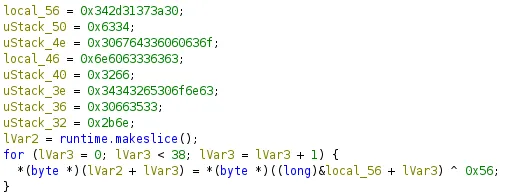
As we can see, there’s some XOR operations to decrypt the bunch of stuff starting from from local_56. In fact, in memory, those variables are next to each other, so the instruction &local_56 + lVar3 will search the value at the address of local_56 PLUS the index of the for loop (with lVar3).
We could take each of those hex values and do the XOR our self like this:
# 0x342d31373a30 -> 0x34 0x2d 0x31 0x37 0x3a 0x30encoded = [ [0x34, 0x2d, 0x31, 0x37, 0x3a, 0x30], [0x63, 0x34], [0x30, 0x67, 0x64, 0x33, 0x60, 0x60, 0x63, 0x6f], [0x6e, 0x60, 0x63, 0x33, 0x63, 0x63], [0x32, 0x66], [0x34, 0x34, 0x32, 0x65, 0x30, 0x6f, 0x6e, 0x63], [0x30, 0x66, 0x35, 0x33], [0x2b, 0x6e]]
for word in encoded: for char in word[::-1]: # LSB, last first print(chr(char ^ 0x56), end="")print()But we also can use gdb to learn new things!
We want to now what is the result of the whole XOR operation. We need to stop the program when it’s exactly just after those instructions. On the code-side of Ghidra, I can click on the line just after the for-loop. It will select the corresponding ASM instruction on the right side. We can the copy the address of the line (in green):
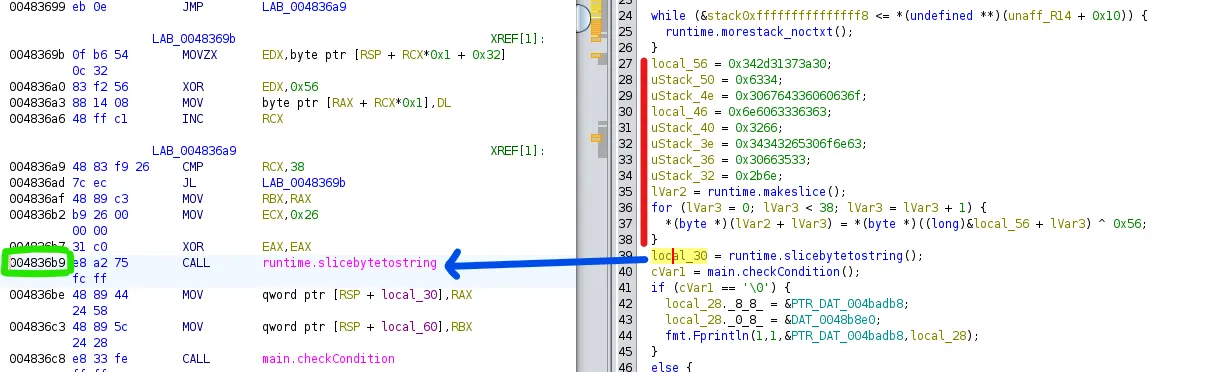
Running gdb with the file (gdb ./GoCrackMe1), we can tell the it to stop at the right time by putting a breakpoint.
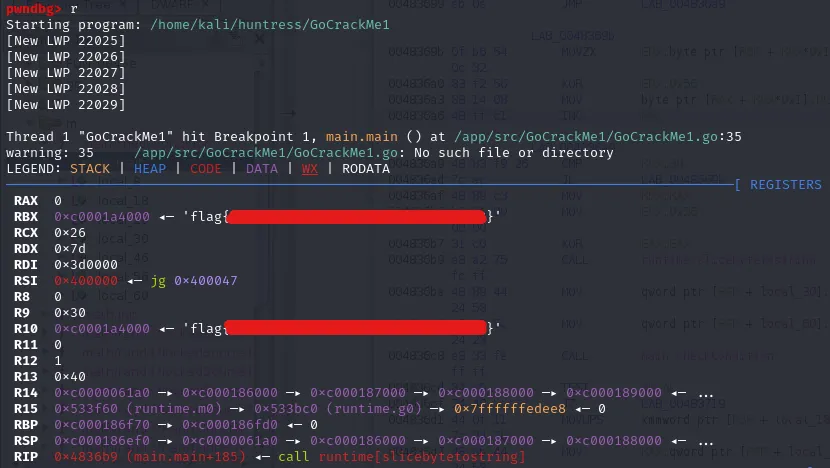
pwndbg> break *0x004836b9Breakpoint 1 at 0x4836b9: file /app/src/GoCrackMe1/GoCrackMe1.go, line 35.We can now run the program using r, so that it will stop automatically once the breakpoint is reached.
The code just being decrypted, we can read the result (the flag) on the registers.